Control PC Fan Speed for Free — FanControl
Control PC fan speeds with custom curves — reduce noise and heat using CPU, GPU and drive temperatures.
When your PC runs hot during gaming or rendering, the default Windows fan management gives you no meaningful control. Fans either scream at full speed or stay quiet while temperatures climb dangerously. FanControl solves this by letting you define exactly how your fans respond to temperature changes from any sensor in your system.
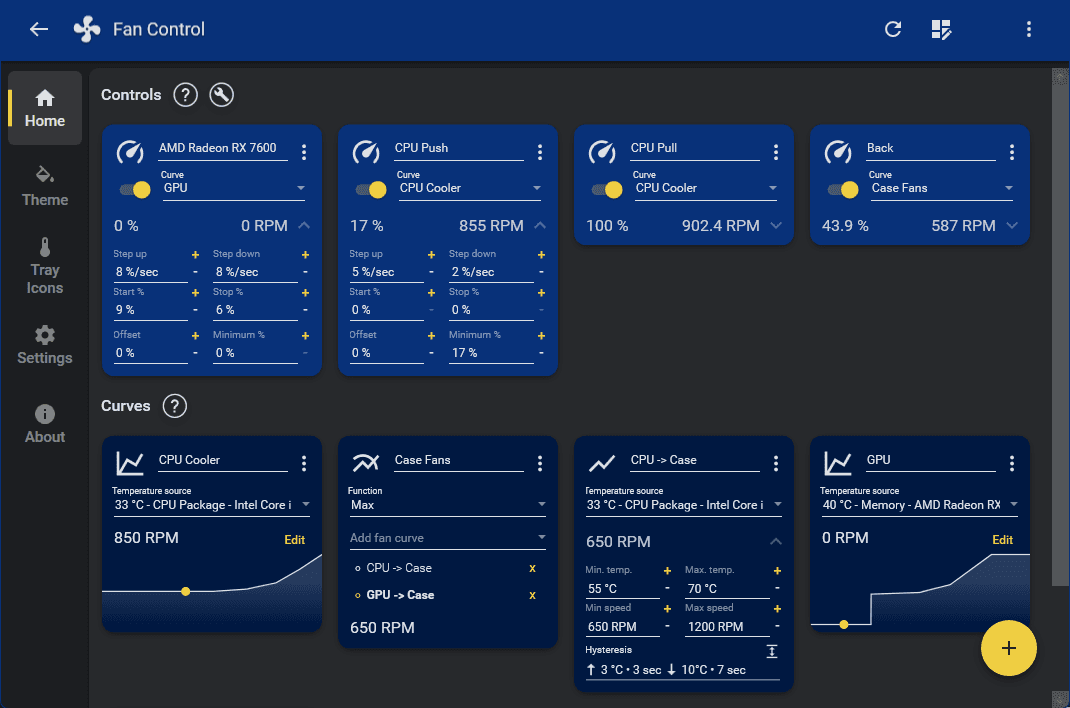
Instead of simple on/off thresholds, FanControl lets you draw custom fan curves on a graph. Set a gentle ramp that keeps fans nearly silent below 60°C, increases speed smoothly as temperatures rise, then hits full speed only above 80°C. You can base fan behavior on CPU temperature, GPU die temperature, motherboard sensors, or drive temperatures — each fan independently.
The software reads from multiple hardware sources simultaneously and supports HWiNFO as an external sensor plugin for maximum compatibility with unusual motherboards and coolers. You can create named profiles for different scenarios: a quiet profile for everyday browsing, a performance profile for gaming sessions, a silent profile for overnight renders. Switching between profiles takes one click from the system tray.
Unlike BIOS fan control, FanControl shows visual feedback in real time — current temperature, fan speed percentage, and RPM all on the same screen. The graph editor makes it intuitive to visualize exactly what will happen at each temperature step.
FanControl is free for personal use on Windows 10 and Windows 11. It requires no account and no registration. A plugin system allows community-built extensions for less common hardware. If your PC sounds like a jet engine under load or throttles from inadequate cooling, FanControl is the most precise free solution available.
Related Tools
- PowerToys — Microsoft's utility suite for system productivity — pairs well with FanControl for a complete Windows tweaking setup